How can I book Accessible tickets online?
To book Accessible tickets for British Airways ARC you’ll need a Nimbus Access Card, whether you’re booking online or through the Accessible ticket booking line. For more information about the Nimbus Access Card click here.
When buying tickets online please make sure, you’re selecting the tickets that best meet your access requirements. You can select Wheelchair Tickets, which is for wheelchair user only, or Ambulant Seating Tickets, which is for customers who do not require wheelchair access. Please note Accessible Tickets cannot be resold or transferred.
If you require more than 2 tickets (including your Personal Assistant), or you have a 2+ symbol on your Nimbus Access Card please contact the venue or the Accessibility Booking Line.
Wheelchair Tickets
Please follow the instructions below to book Wheelchair Tickets:
1. Head to britishairwaysarc.co.uk, click ‘What’s on’ from the navigation bar and search for the event you want.
2. Click ‘Buy Tickets’. Choose your date and click ‘Select Tickets’ on the ‘Wheelchair Tickets’ tile.
Enter your First name, Last name, and Nimbus Access Card number exactly as they appear in your card. This will unlock the wheelchair accessible spaces for you to book online.
3. Click on the map – the blue sections are where there are available wheelchair accessible spaces that meet the requirements, as per your Nimbus Access card. Choose your space. If you need a Personal Assistant ticket and are entitled to one, as per your Nimbus Access card, you must also book this at this stage (examples below).
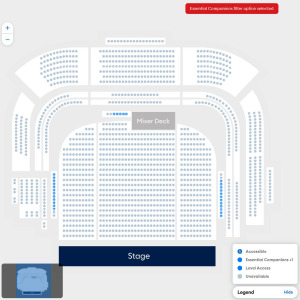
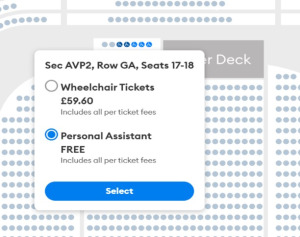
4. Click ‘Checkout’ and complete your booking in the usual way. Please check your booking before paying, a summary of the tickets that you have put into your basket and make sure they are wheelchair accessible by looking for “level access” as some spaces in front balcony are not dedicated wheelchair bays (example below).
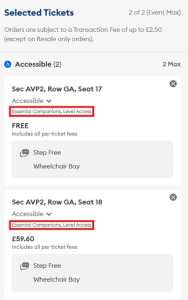
5. Once you’ve bought your tickets, confirmation emails are usually sent straight away – but it may take a little longer for popular shows. If it’s been over four hours, check your junk or spam folders, and if they’re not there, please contact the venue at general@britishairwaysarc.co.uk.
Ambulant Accessible Tickets
Please follow the instructions below to book Ambulant Tickets:
1. Head to britishairwaysco.uk, click ‘What’s on’ from the navigation bar and search for the event you want.
2. Click ‘Buy Tickets’. Choose your date and click ‘Select Tickets’ on the ‘Ambulant Accessible Tickets’ tile. Enter your First name, Last name, and Nimbus Access Card number exactly as they appear in your card. This will unlock the accessible seats for you to book online.
3. Click on the map – the blue sections are where there are available accessible seats that meet the requirements, as per your Nimbus Access card. Make sure you are selecting the tickets that best meet your access requirements. Use the Accessibility Requirements filter (located under the artist’s name and next to the price filter when viewing the seat map), so you can select your Accessibility Requirements (example below).
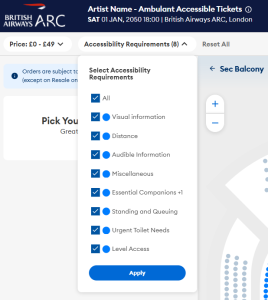
Accessibility Requirements filter
4. You can check seat descriptions for details such as steps by hovering over the seat or adding it to your basket (see example picture below). Not all seats that you see will be suitable for you, so please use the filter to find the seats that meet your full requirements. For example, if your access card lists “miscellaneous,” all seats will be unlocked, but if distance or urgent toilet access are a priority for you, select those filters to narrow the list to seats that best support your needs.
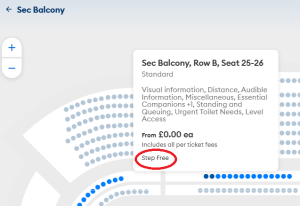
Seat descriptions
5. When you add tickets to your basket, you’ll also be able to see any other seat information such as how many steps to the seats, aisle seats, restricted views and any other details that might be useful regarding the seat that you selected (see example picture below).
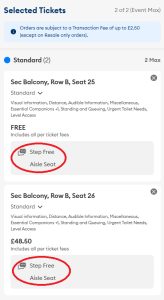
How can I book Accessible Tickets over the phone?
You can book Accessible Tickets over the phone if you are unable to book online. There is usually significant demand when events go on sale, so we advise that guests purchase accessible tickets online rather than attempting by phone.
To book Accessible Tickets, you’ll need a Nimbus Access card, whether you’re booking online or through the accessible ticket booking line.
Please note, this is a line for Accessible Ticket bookings only, for any other enquiries please email the venue at general@britishairwaysarc.co.uk
The phone lines are being temporarily operated by the AXS Contact Centre. To book Accessibility Tickets over the phone please call 0344 581 0808 and select British Airways ARC. You can reach them Monday – Friday 9AM-5PM. The lines are closed on weekends and bank holidays.
Accessible Tickets cannot be resold or transferred.
Free Companion/ Personal Assistant tickets
Personal Assistant (PA) tickets are only available to guests with the correct symbol on their Nimbus Access card. We offer free Personal Assistant tickets to anyone who needs extra support, due to a disability or long-term health condition. By accepting this ticket, your companion accepts responsibility for giving you the extra support you need whilst you’re with us.
Personal Assistant tickets are only available through the venue’s official ticketing partner AXS, and no other ticket agents. PA tickets must be booked with Accessible Tickets. If this isn’t chosen at the time of booking, then adding a PA later may not be possible. Our policy states that the PA must sit next to the accessible guest, and if no PA is chosen at the time of booking, the seats next to you may get sold.
If you require more than 2 tickets (including your Personal Assistant) or have a 2+ symbol on your Nimbus Access card, please contact the venue at general@britishairwaysarc.co.uk or call the Accessibility Booking line on 0344 581 0808.
British Sign Language
If you wish to book British Sign Language, please contact the venue at general@britishairwaysarc.co.uk.